Sunday, January 22, 2017

OBIEE 12C 12.2.1.2.0 Installation in Windows 8

OBIEE 12C 12.2.1.2.0 Installation in Windows 8


ODI 12c 12.2.1.2.6 Installation in windows 8 with Standalone Agent Configuration.

ODI 12c 12.2.1.2.6 Installation in windows 8 with Standalone Agent Configuration.

1) Install JDK 1.8
2) Install Oracle 12c Database.
3) Install ODI 12c
4) Configure ODI 12C Standalone agent using RCU.
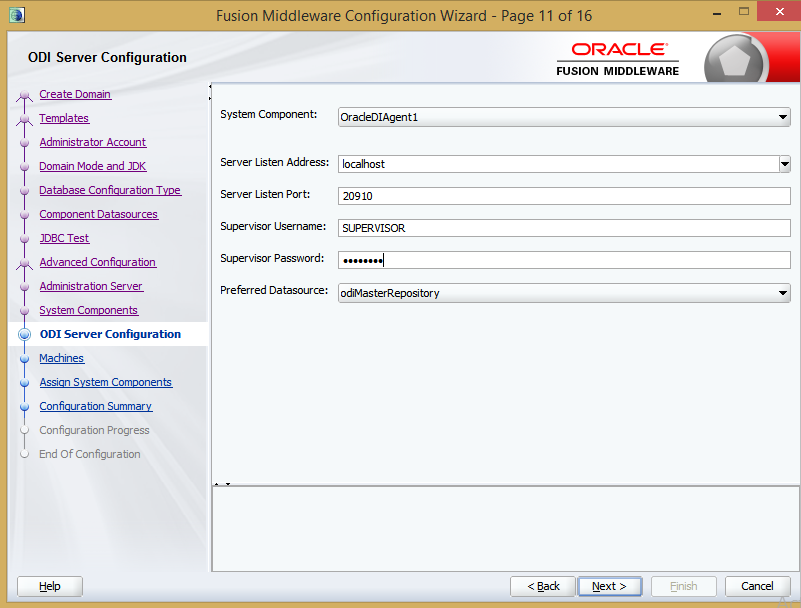
5) Creating Domain for Standalone Agent configuration
6) Starting Standalone agent using command line.


Creating Master & Work Repository Using RCU utility.


Creating Weblogic Server Domain for ODI Standalone Agent.


 C:\ODI12C\oracle_common\common\bin

Run Config windows batch file with Administrator user


Create Physical Agent in Topology. 
Agent Name:  OracleDIAgent1
PortNumber: 20910


Start the ODI Standalone agent using below Windows Command.
Change the directory to Agent File location.

cd C:\ODI12C\user_projects\domains\base_domain\bin

Agent -NAME=OracleDIAgent1 -PORT=20910


 Then test the agent in ODI Topology=> Click on Test and it will validate the newly created Agent.


Friday, December 16, 2016

ORA-01113: file 1 needs media recovery ORA-01589: Must use RESETLOGS or NORESETLOGS option for database open

 
 ORA-01113: file 1 needs media recovery 
 ORA-01110: data file 1: 'C:\APP\RESWANTHREDDY\ORADATA\ORCL\SYSTEM01.DBF'

ORA-01589: Must use RESETLOGS or NORESETLOGS option for database open


SQL> alter database open;
alter database open
*
ERROR at line 1:
ORA-01589: must use RESETLOGS or NORESETLOGS option for database open


SQL> alter database open resetlogs;
alter database open resetlogs
*
ERROR at line 1:
ORA-01194: file 1 needs more recovery to be consistent
ORA-01110: data file 1: 'C:\APP\RESWANTHREDDY\ORADATA\ORCL\SYSTEM01.DBF'


=>Find the redo log file which belongs to current using below query.


SQL> SELECT MEMBER FROM V$LOG G, V$LOGFILE F WHERE G.GROUP# = F.GROUP# AND G.STA
TUS = 'CURRENT';


MEMBER
--------------------------------------------------------------------------------

C:\APP\RESWANTHREDDY\ORADATA\ORCL\REDO03.LOG


RECOVER DATABASE USING BACKUP CONTROLFILE UNTIL CANCEL


SQL> RECOVER DATABASE USING BACKUP CONTROLFILE UNTIL CANCEL
ORA-00279: change 10897833 generated at 12/02/2016 20:55:41 needed for thread 1
ORA-00289: suggestion :
C:\APP\RESWANTHREDDY\FAST_RECOVERY_AREA\ORCL\ARCHIVELOG\2016_12_16\O1_MF_1_723_%

U_.ARC
ORA-00280: change 10897833 for thread 1 is in sequence #723


Specify log: {<RET>=suggested | filename | AUTO | CANCEL}
C:\APP\RESWANTHREDDY\ORADATA\ORCL\REDO03.LOG
Log applied.
Media recovery complete.


=> Open the database in RESETLOGS mode.
 
SQL> alter database open resetlogs;

Database altered.

SQL>

Thursday, December 1, 2016

Purging OBIEE Cache from OBIEE Report and Scheduling using BI Agent.

Purging OBIEE Cache from OBIEE Report and Scheduling using BI Agent.

1) Create New Connection Pool with ODBC 2.0 Type and Weblogic Server Username and Password.

2) Create New OBIEE Report from Create Direct Database Request.


3)  Connect Pool Name and Call SAPurgeAllCache(); command.


4)  Run The Report and Schedule this report using BI Agent After Completion of ETL Loads and Add Mail Alert Notification.


Using Linux Shell Script to check OBIEE Server status and Sending Mail Alert


#!/bin/bash
#
#
#=============================================================================
# SCRIPT NAME        : check_bisever_status.sh
# SCRIPT DESCRIPTION : This script can be used for to verify bi server  status
# CREATE DATE        : Mar 12, 2016
# AUTHOR             : Raveendra Reddy T.
#=============================================================================
# call OBIEE Environemnt variables profile
#. .profile
cd /home/obiee

export today=$date
# Email Id
tomail=ravindratal@gmail.com
echo $todate
# Logfile 
export logfile=./biserver.log
# Using PS we will get the Process ID for bi_server1 server to check the status.
ps -ef |grep bi_server1 | grep -v grep <biserver.log

PID=`ps -eaf | grep bi_server1 | grep -v grep | awk '{print $2}'`

echo $PID <biserver.log
# Validating and sending mail server status. 
if [[ "" !=  "$PID" ]]; then
 mail -s "BI Server is UP & Running Fine  PID=> $PID " "Hi All, BI Server Is UP & Running Fine "    $tomail <biserver.log
else
mail -s "BI Server is not running " $tomail  <biserver.log
fi

echo $biserver
echo  "done"
exit