Showing posts with label ODI 12C. Show all posts

Saturday, August 2, 2014

ODI 12c 12.1.2 Export issue fixing with bug : Patch 17671595


ODI 12c 12.1.2 Export issue fixing with bug : Patch 17671595 

Patch 17671595: CANNOT EXPORT WORK REPOSITORY WITH SOME PROJECTS


Oracle Data Integrator - Version 12.1.2.0.0 to 12.1.2.0.1 [Release 12c]

Exporting an ODI 12c 12.1.2 Work Repository using the standard export tool fails with the following error:
java.lang.RuntimeException: java.lang.NullPointerException
  at com.sunopsis.dwg.smartie.SmartExportOrderList$1$1.doAction(SmartExportOrderList.java:561)
  at oracle.odi.core.persistence.dwgobject.DwgObjectTemplate.execute(DwgObjectTemplate.java:203)
  at com.sunopsis.dwg.smartie.SmartExportOrderList$1.doInTransaction(SmartExportOrderList.java:551)
  at oracle.odi.core.persistence.transaction.support.TransactionTemplate.execute(TransactionTemplate.java:99)
  at com.sunopsis.dwg.smartie.SmartExportOrderList.printExportObjects(SmartExportOrderList.java:545)
  at com.sunopsis.dwg.smartie.SmartExportUtils.exportToXml(SmartExportUtils.java:2889)
  at com.sunopsis.dwg.smartie.SmartExportUtils.exportToXml(SmartExportUtils.java:2763)
  at oracle.odi.impexp.smartie.impl.DependencyServiceImpl.exportToXml(DependencyServiceImpl.java:429)
  at oracle.odi.ui.smartie.exp.ExportSmartDialog.exportToXml(ExportSmartDialog.java:1462)
  at oracle.odi.ui.smartie.exp.ExportSmartDialog$1.doInBackground(ExportSmartDialog.java:1252)
  at oracle.odi.ui.smartie.exp.ExportSmartDialog$1.doInBackground(ExportSmartDialog.java:1220)
  at oracle.odi.ui.framework.AbsUIRunnableTask.run(AbsUIRunnableTask.java:258)
  at oracle.ide.dialogs.ProgressBar.run(ProgressBar.java:920)
  at java.lang.Thread.run(Thread.java:744)
Caused by: java.lang.NullPointerException
  at com.sunopsis.dwg.dbobj.SnpMcConstraint.getForeignKeyLst(SnpMcConstraint.java:104)
  at com.sunopsis.dwg.ImpExpFkXrefManager.addFkXRefs(ImpExpFkXrefManager.java:164)
  at com.sunop

Friday, August 1, 2014

Get Physical Schema name using odiref in ODI


Using below method we can get Database  SchemaName.

select *  from all_tables where
owner= '<%=odiRef.getSchemaName()%>'

Using below method we can get Database  SchemaName for Default Physical Schema from your Databaserver.

select *  from all_tables where
owner= '<%=odiRef.getSchemaNameDefaultPSchema()%>
' 

Saturday, July 5, 2014

What is Deployment plan in ODI 12c Feature?

In ODI 12c we have another feature called Deployment Feature.
What is this Deployment Feature?
In our projects we will create interfaces or mappings for loading the data from source to target
with FULL LOAD or INCREMENTAL Load.

FULL LOAD:  IKM Control Append (First time when golive time we can use this)
INCREMENTAL LOAD:  IKM Incremental Update ( After first load then we can use this)
If we want implement this two we need to go for two interfaces in 10G or 11G.
But in 12c we can create same mappings with more than one deployment plan.  In this example i have create two deployment plans.

EMP1_DS as for CDC Load ( IKM SQL Incremental Update).
FULL_LOAD: IKM SQL Control append

For golive we can execute this  FULL_LOAD Deployment plan.
And Next run onwards we can select EMP1_DS for Incremental load i.e., only for changed data
from source.


Wednesday, July 2, 2014

ODI 12c SCD Type 2 Step by Step Implementation

ODI 12c SCD Type 2 is very easy compare to ODI 11G.

Please find the below steps for SCD Type 2 implementation.

I have created new target table to support SCD behaviour.

CREATE TABLE DEV.SCD
  (
    EMPLOYEE_ID           NUMBER(6,0),
    FIRST_NAME             VARCHAR2(20 BYTE),
    LAST_NAME              VARCHAR2(25 BYTE) NOT NULL ENABLE,
    EMAIL                         VARCHAR2(25 BYTE) NOT NULL ENABLE,
    PHONE_NUMBER     VARCHAR2(20 BYTE),
    HIRE_DATE                DATE NOT NULL ENABLE,
    JOB_ID                       VARCHAR2(10 BYTE) NOT NULL ENABLE,
    SALARY                     NUMBER(8,2),
    COMMISSION_PCT NUMBER(2,2),
    MANAGER_ID           NUMBER(6,0),
    DEPARTMENT_ID     NUMBER(4,0),
    STATUS_FLAG          VARCHAR2(1 BYTE),
    STARTING_DATE      DATE,
    ENDING_DATE          DATE
  )  TABLESPACE SYSTEM ;


Step1:
------
Import IKM Oracle Slowly Changing Dimension  Knowledge module.


Step2:
--------
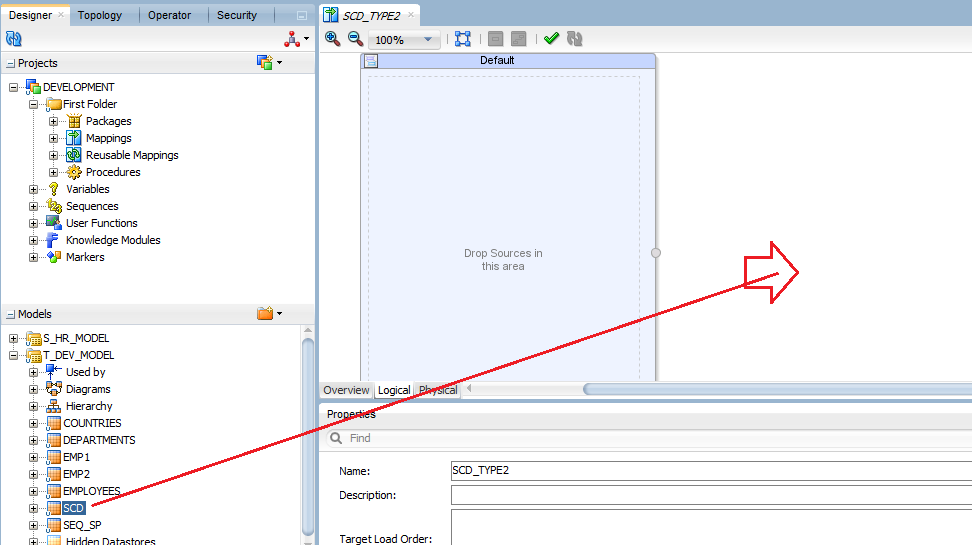
Open Target SCD table and Change the SCD Behavior.


I have select SCD Behavior like below options.


Step3:
-------
Creating Mapping for Loading the data from Source table (hr.employees) table to
target table (dev.scd).


These three columns we are not receiving from Source , we need to map at direct target table


I have done mapping STATUS_FLAG=1 ( Default Active-1, Inactive-0),
STARTING_DATE=SYSDATE ,
ENDING_DATE = SYSDATE( But it will take default value from IKM SCD as 01-01-2400.


Selecting LKM SQL to SQL Knowledge module in Physical Tab


Selecting IKM Oracle Slowly Changing Dimension Knowledge Module 


Selecting CKM SQL knowledge module for Data Quality validation at I$table.


Running Interface using Run button in Top Menu


Target table is empty as of now there is not records in target SCD table.


Program executed successfully. We can see the status as Green  .


110 records are inserted as STATUS_FLAG=1 as New Records or active records.


UPDATE hr.employees SET salary=77777 WHERE employee_id=100;

COMMIT;

I have update data in source table and again i am running my mapping.


Program finished successfully.


One record got inserted as salary got changed it will Add row on change behavior


We can see the modified record inserted as new records and old record updated STATUS_FLAG=0
inactive record.  STATUS-FLAG=1 is active for new records.


Wednesday, June 18, 2014

New Features in Oracle Data Integrator 12c (12.1.2)


New Features in Oracle Data Integrator 12c (12.1.2)


Declarative Flow-Based User Interface
The new declarative flow-based user interface combines the simplicity and ease-of-use of the declarative approach with the flexibility and extensibility of configurable flows. Mappings (the successor of the Interface concept in Oracle Data Integrator 11g) connect sources to targets through a flow of components such as Join, Filter, Aggregate, Set, Split, and so on.
Reusable Mappings
Reusable Mappings can be used to encapsulate flow sections that can then be reused in multiple mappings. A reusable mapping can have input and output signatures to connect to an enclosing flow; it can also contain sources and targets that are encapsulated inside the reusable mapping.


Multiple Target Support
A mapping can now load multiple targets as part of a single flow. The order of target loading can be specified, and the Split component can be optionally used to route rows into different targets, based on one or several conditions.

Step-by-Step Debugger
Mappings, Packages, Procedures, and Scenarios can now be debugged in a step-by-step debugger. Users can manually traverse task execution within these objects and set breakpoints to interrupt execution at pre-defined locations. Values of variables can be introspected and changed during a debugging session, and data of underlying sources and targets can be queried, including the content of uncommitted transactions.

Runtime Performance Enhancements
The runtime execution has been improved to enhance performance. Various changes have been made to reduce overhead of session execution, including the introduction of blueprints, which are cached execution plans for sessions. Performance is improved by loading sources in parallel into the staging area. Parallelism of loads can be customized in the physical view of a map. Users also have the option to use unique names for temporary database objects, allowing parallel execution of the same mapping.
Oracle GoldenGate Integration Improvements
The integration of Oracle GoldenGate as a source for the Change Data Capture (CDC) framework has been improved in the following areas:
·         Oracle GoldenGate source and target systems are now configured as data servers in Topology. Extract and replicate processes are represented by physical and logical schemas. This representation in Topology allows separate configuration of multiple contexts, following the general context philosophy.
·         Most Oracle GoldenGate parameters can now be added to extract and replicate processes in the physical schema configuration. The UI provides support for selecting parameters from lists. This minimizes the need for the modification of Oracle GoldenGate parameter files after generation.
·         A single mapping can now be used for journalized CDC load and bulk load of a target. This is enabled by the Oracle GoldenGate JKM using the source model as opposed to the Oracle GoldenGate replication target, as well as configuration of journalizing in mapping as part of a deployment specification. Multiple deployment specifications can be used in a single mapping for journalized load and bulk load.
·         Oracle GoldenGate parameter files can now be automatically deployed and started to source and target Oracle GoldenGate instances through the JAgent technology.
Standalone Agent Management with WebLogic Management Framework
Oracle Data Integrator standalone agents are now managed through the WebLogic Management Framework. This has the following advantages:
·         UI-driven configuration through Configuration Wizard
·         Multiple configurations can be maintained in separate domains
·         Node Manager can be used to control and automatically restart agents
Integration with OPSS Enterprise Roles
Oracle Data Integrator can now use the authorization model in Oracle Platform Security Services (OPSS) to control access to resources. Enterprise roles can be mapped into Oracle Data Integrator roles to authorize enterprise users across different tools.
XML Improvements
The following XML Schema constructs are now supported:
·         list and union - List or union-based elements are mapped into VARCHAR columns.
·         substitutionGroup - Elements based on substitution groups create a table each for all types of the substitution group.
·         Mixed content - Elements with mixed content map into a VARCHAR column that contains text and markup content of the element.
·         Annotation - Content of XML schema annotations are stored in the table metadata.
Oracle Warehouse Builder Integration
Oracle Warehouse Builder (OWB) jobs can now be executed in Oracle Data Integrator through the OdiStartOwbJob tool. The OWB repository is configured as a data server in Topology. All the details of the OWB job execution are displayed as a session in the Operator tree. For more information about this feature, see "OdiStartOwbJob".
Unique Repository IDs
Master and Work Repositories now use unique IDs following the GUID convention. This avoids collisions during import of artifacts and allows for easier management and consolidation of multiple repositories in an organization.


Friday, June 6, 2014

Added Pivot , Unpivot ,Table functions and sub query objects in new ODI 12.1.2 patch number 17053768

Finally we got PIVOT and other three objects UNPIVOT , TABLE Function & Subquery Filter in Mapping after applying the Opatch 17053768

Copy your opatch file into C:\TEMP  directory (odi_1212_opatch\17053768)

C:\Java\jdk1.7.0_55\bin>set PATH=D:\Oracle\Middleware\Oracle_Home\OPatch;%PATH%


C:\Java\jdk1.7.0_55\bin>cd C:\TEMP\odi_1212_opatch

C:\TEMP\odi_1212_opatch>where opatch
D:\Oracle\Middleware\Oracle_Home\OPatch\opatch
D:\Oracle\Middleware\Oracle_Home\OPatch\opatch.bat

C:\TEMP\odi_1212_opatch>where unzi[
INFO: Could not find files for the given pattern(s).

C:\TEMP\odi_1212_opatch>where unzip
D:\ORACLEXE\app\oracle\product\11.2.0\server\bin\unzip.exe

C:\TEMP\odi_1212_opatch>opatch napply 17053768
Oracle Interim Patch Installer version 13.1.0.0.0
Copyright (c) 2013, Oracle Corporation.  All rights reserved.


Oracle Home       : D:\Oracle\MIDDLE~1\ORACLE~1
Central Inventory : C:\Program Files\Oracle\Inventory
   from           : n/a
OPatch version    : 13.1.0.0.0
OUI version       : 13.1.0.0.0
Log file location : D:\Oracle\MIDDLE~1\ORACLE~1\cfgtoollogs\opatch\opatch2014-06
-06_23-11-38PM_1.log


OPatch detects the Middleware Home as "D:\Oracle\Middleware\Oracle_Home"

Verifying environment and performing prerequisite checks...
OPatch continues with these patches:   17053768

Do you want to proceed? [y|n]
y
User Responded with: Y
All checks passed.

Please shutdown Oracle instances running out of this ORACLE_HOME on the local sy
stem.
(Oracle Home = 'D:\Oracle\MIDDLE~1\ORACLE~1')


Is the local system ready for patching? [y|n]
y
User Responded with: Y
Backing up files...
Applying interim patch '17053768' to OH 'D:\Oracle\MIDDLE~1\ORACLE~1'

Patching component oracle.odi.sdk, 12.1.2.0.0...

Patching component oracle.odi.studio, 12.1.2.0.0...

Verifying the update...
Patch 17053768 successfully applied.
Log file location: D:\Oracle\MIDDLE~1\ORACLE~1\cfgtoollogs\opatch\opatch2014-06-
06_23-11-38PM_1.log

OPatch succeeded.

C:\TEMP\odi_1212_opatch>

Before Starting ODI12c Studio Client first Delete   odi_1212_opatch  directory from

C:\TEMP\odi_1212_opatch

If you are not deleted above folder then you can't find new Pivot and other objects

Next Start your ODI12c Studio Client then we can new objects in Mapping.


Thursday, June 5, 2014

Added Pivot , Unpivot ,Table functions and sub query objects in new ODI 12.1.2 patch number 17053768

Added Pivot , Un pivot ,Table functions and sub query objects in new ODI 12.1.2 patch number 17053768


Difference Between ODI 11g (11.1.1.7) and ODI 12c (12.1.2)


Difference Between ODI 11g (11.1.1.7) and ODI 12c (12.1.2)
ODI 11G(11.1.1.7)
ODI 12C (12.1.2)
No Multiple target tables in a single Interface
We can load multiple targets tables In single mapping
Interface
Mappings & Reusable Mappings
No Reusable mappings in Global Objects
Reusable Mappings Added in Global Objects
Stand Alone & J2ee Agent
Stand Alone, Colocated & J2ee Agent
Only NG-Profiles is  NG_DESIGNER
Added aditional NG profiles NG_CONSOLE,
NG_METADATA_ADMIN,NG_VERSION_ADMIN
No Wallet Password
Added Wallet Password
No-Direct role selection while creating users.
 Manually Drag n Drop
Direct Role selection whilre creating users
No-  Hive Technology For Hadoop in Topology
Added New Hive Technology For Hadoop  in Topology
No - Pivot functions
Available below functions in Opatch 17053768
1) Pivot Component
2) Unpivot Component
 
3) Table Function Component
4) Subquery Filter Component
Sequence Enhancements only NEXTVAL
Sequence Enhancements  CURRVAL & NEXTVAL
No  Split or Sort or set objects
Declarative Flow-Based User Interface
---------------------------------------------------
The new declarative flow-based user interface combines the simplicity and ease-of-use of the declarative approach with the flexibility and extensibility of configurable flows. Mappings (the successor of the Interface concept in Oracle Data Integrator 11g) connect sources to targets through a flow of components such as Join, Filter, Aggregate, Sort,Set, Split, and so on.
XML Improvements
-------------------------
The following XML Schema constructs are now supported:
list and union - List or union-based elements are mapped into VARCHAR columns.
substitutionGroup - Elements based on substitution groups create a table each for all types of the substitution group.
Mixed content - Elements with mixed content map into a VARCHAR column that contains text and markup content of the element.
Annotation - Content of XML schema annotations are stored in the table metadata.


Wednesday, June 4, 2014

ODI 12c Repository Creation in Mysql database

We can Create ODI 12c Repository RCU in MYSQL database 5.6.12 and above versions.

Before installation we need to add below three parameters in My.ini  parameter file in mysql.


# Uncomment the following if you are using InnoDB tables

innodb_file_format=Barracuda
innodb_large_prefix=ON
log_bin_trust_function_creator=ON

Tuesday, June 3, 2014

ODI 12c StandAlone Installation Step By Step Windows 7

Step1:    Download ODI 12c Software from Oracle Download. ofm_odi_generic_12.1.2.0.0_disk1_1of1.zip 
ODI 12c   

Step2:  Unzip 12.1.2  zip file.

step3:  Open CMD prompt as Administrator

step4:  Install JDK 1.7 in C:\java\  location.

Using below command to launch ODI installation wizard.  java -jar E:\ODI12c\odi_121200.jar

C:\Windows\system32>cd C:\Java\jdk1.7.0_55\bin

C:\Java\jdk1.7.0_55\bin>java -jar E:\ODI12c\odi_121200.jar


Step5: Click on Next

Step6:  Select your installation location.


Step7:  Select  Standalone installation option.

It will install the below plugins  except  ODI Studio & J2ee Agents and ODI Console


Step8:  Validating the system requirements


Step9:  Deselect the option for Oracle Support 


Step10:  click on Install option for installation.