Showing posts with label AGENTS. Show all posts

Tuesday, July 1, 2014

ODI 12c J2EE Agent & Standalone Colacated Agent Configuration

J2EE Agent will work  After mapping with WLST credentials  Both SUPERVISER & weblogic
User names and password.


Please find the below steps for Creating Domain for ODI Console, J2ee Agent & Standalone Colacated Agent Configuration.

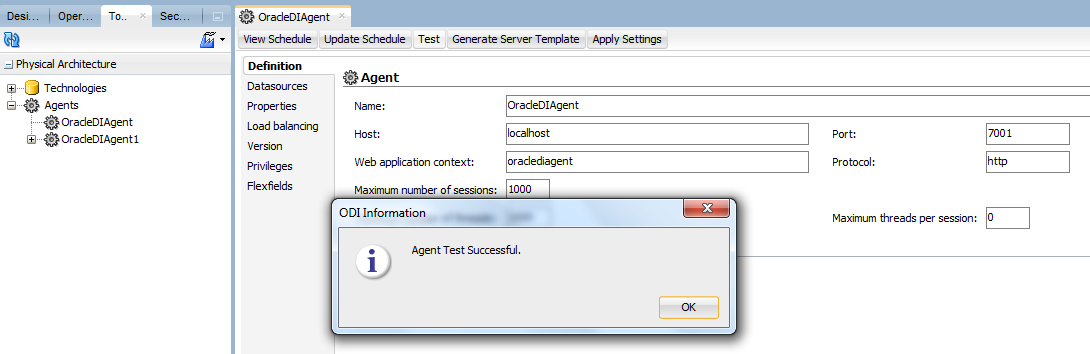
Step1:  Agent Creation in TOPOLOGY

Agent name:  OracleDIAgent  ( Case sensitive)
Portno:  7001  ( Weblogic server portno)

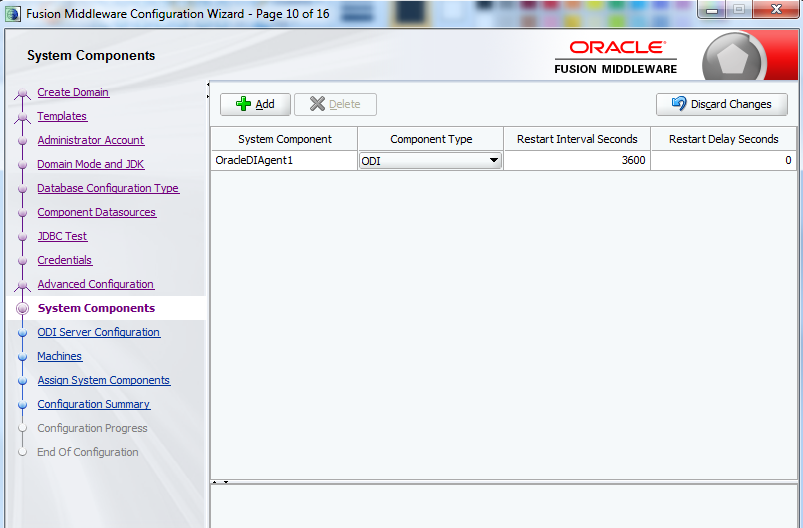
Step2:  Domain Creation for J2ee Agent, Odi Console and Colocated Agent.


After finishing domain creation start weblogic server  using startWeblogic.batch file in windows
startWebLogic.sh  file for unix or linux.


You can see the weblogic service status as RUNNING.


Open below url for weblogic server console.

http://localhost:7001/console

Credentials should same as at the time of Domain creation we provided username and password.

username:  weblogic
Password:  Admin123


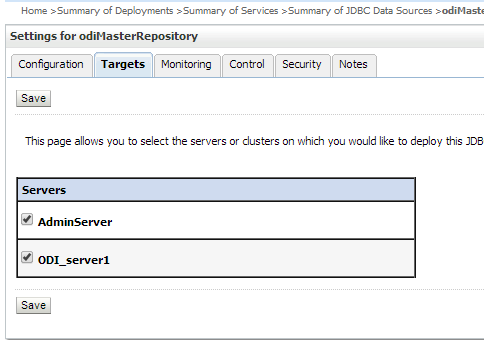
Goto=>Home >Summary of Services >Summary of JDBC Data Sources

Click on Master repository=>Goto=>Target Tab=>Select Admin Server
click Save


Click on Master repository=>Goto=>Target Tab=>Select Admin Server
click Save
Same as Work repository we need to add Admin server
Click on Work repository=>Goto=>Target Tab=>Select Admin Server
click Save.


Restart services and Goto=>Topology=>Agents=>OracleDIAgent
Click on Test agent.

Friday, April 26, 2013

Delete duplicate records from a table

1 ) Write a Query To Delete The Repeted Rows from emp table;
SQL>Delete from emp where rowid not in(select min(rowid)from emp group
by ename)
               
2) TO DISPLAY 5 TO 7 ROWS FROM A TABLE
SQL>select ename from emp
         where rowid in(select rowid from emp where rownum<=7
         minus
  select rowid from empi where rownum<5)

3)  DISPLAY  TOP N ROWS FROM TABLE?

SQL>SELECT * FROM
                (SELECT *  FROM EMP ORDER BY ENAME DESC)
                 WHERE ROWNUM <10;

4) DISPLAY   TOP 3 SALARIES FROM EMP;
SQL>SELECT SAL FROM ( SELECT  * FROM EMP ORDER  BY SAL DESC )
                   WHERE ROWNUM <4

5) DISPLAY  9th FROM THE EMP TABLE?
SQL>SELECT ENAME FROM EMP
                WHERE ROWID=(SELECT ROWID FROM EMP WHERE ROWNUM<=10
                MINUS
                SELECT ROWID FROM EMP WHERE ROWNUM <10)
                select second max salary from emp;
                select max(sal) fromemp where sal<(select  max(sal) from emp);

Thursday, July 19, 2012

ODI 11g StandAlone Agent Configuration step by step

Goto Your ODI Agent Bin Installation directory

like

C:/oracle/Middleware/oracle_ODI1/oracledi/agent/bin

edit odiparams.bat for windows


 Goto CMD prompt and open below path


C:/oracle/Middleware/oracle_ODI1/oracledi/agent/bin

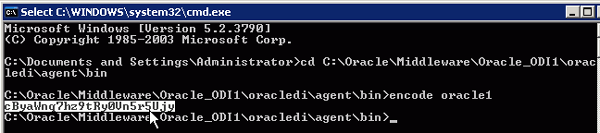
 using encode generate your password
encode oracle1( oracle1 is password) password is encoded


mark encoded password for both SUPERVISOR and Master Repository Passwords


Create agent for Standalone and portno 20910 default no
and 


ODI 11G J2EE Agent step by step Configuration in WLS Part 2

Create new physical agent   "OracleDIAgent" like the same


Goto CMD prompt and open your WLS installed drive ex
C:/oracle/Middleware/oracle_common/common/bin

Type wlst and enter


it will connect wlst


execute the following command:

connect('weblogic','Admin123','t3://localhost:7001') 

weblogic user name and password and host and port number

and enter


Execute the following command to add the correct credential store for ODI Supervisor :

 createCred (map="oracle.odi.credmap", key="SUPERVISOR", user="SUPERVISOR", password="welcome", desc="ODI SUPERVISOR Credential").


IAlso execute the command to add the correct credential store for the domain ODI-DOMAIN :


createCred (map="oracle.odi.credmap", key="ODI-DOMAIN", user="weblogic", password="Admin123", desc="ODI-DOMAIN Credential"). 


exit and start your weblogic domain services

and goto ODI Topology admin and open OracleDIAgent and test


Monday, June 18, 2012

Difference between Java EE &. Standalone Agents

Java EE vs. Standalone Agents


In 11g, the agents can optionally be installed as applications in a Oracle WebLogic Server, and automatically benefit from the clustering, load-balancing, datasources and connection pooling features available with the application server. They are by default scalable and highly available.

 Standalone Agents (like in 10g) and Java EE Agents (in WLS). Well, they are (almost) the same piece of code. The main difference is where/how you install them (in WLS or on top of a JVM) and the features that you benefit from this installation.
Typically:
  • The Standalone agent is easier to deploy anywhere, but does not have clustering or connection pooling. It can rely on Oracle Process Manager and Notification Server (OPMN) for being protected and monitored like a service and it can use the built-in ODI Load Balancing feature.
  • The Java EE agent is slightly more complex to set up (you need to install WLS first, set up a domain, and so forth), but gives you access to a different world in terms of enterprise-scale deployment: clustering, load-balancing, centralized monitoring and so forth.

Note that the choice between the two type of agents is really a user choice, and it is easy to mix both these type of agents seamlessly into an ODI architecture. (yes, you read that correctly, the standalone and JEE agents can be used together in the same network topology!)