Thursday, June 26, 2014

Data Warehousing Tutorial Part - 7

Types of Facts In Data Warehousing ?

Additive:
Additive facts are facts that can be summed up through all of the dimensions in the fact table. A sales fact is a good example for additive fact.
Semi-Additive:
Semi-additive facts are facts that can be summed up for some of the dimensions in the fact table, but not the others.
Eg: Daily balances fact can be summed up through the customers dimension but not through the time dimension.
Non-Additive:
Non-additive facts are facts that cannot be summed up for any of the dimensions present in the fact table.
Eg: Facts which have percentages, ratios calculated.

Factless Fact Table:
 In the real world, it is possible to have a fact table that contains no measures or facts. These tables are called “Factless Fact tables”.
Eg: A fact table which has only product key and date key is a factless fact. There are no measures in this table. But still you can get the number products sold over a period of time.
Based on the above classifications, fact tables are categorized into two:
Cumulative:
This type of fact table describes what has happened over a period of time. For example, this fact table may describe the total sales by product by store by day. The facts for this type of fact tables are mostly additive facts. The first example presented here is a cumulative fact table.
Snapshot:
This type of fact table describes the state of things in a particular instance of time, and usually includes more semi-additive and non-additive facts. The second example presented here is a snapshot fact table.


Continue with Data Warehousing Tutorial Part - 8 ...)

Data Warehousing Tutorial Part - 6

Types of Dimensions in Data Warehousing?
Dimension -
A dimension table typically has two types of columns, primary keys to fact tables and textual\descreptive data.?
Fact -A fact table typically has two types of columns, foreign keys to dimension tables and measures those that contain numeric facts. A fact table can contain fact’s data on detail or aggregated level.

Types of Dimensions -
Slowly Changing Dimensions:
 Attributes of a dimension that would undergo changes over time. It depends on the business requirement whether particular attribute history of changes should be preserved in the data warehouse. This is called a Slowly Changing Attribute and a dimension containing such an attribute is called a Slowly Changing Dimension.

Rapidly Changing Dimensions:
A dimension attribute that changes frequently is a Rapidly Changing Attribute. If you don’t need to track the changes, the Rapidly Changing Attribute is no problem, but if you do need to track the changes, using a standard Slowly Changing Dimension technique can result in a huge inflation of the size of the dimension. One solution is to move the attribute to its own dimension, with a separate foreign key in the fact table. This new dimension is called a Rapidly Changing Dimension.

Junk Dimensions:
A junk dimension is a single table with a combination of different and unrelated attributes to avoid having a large number of foreign keys in the fact table. Junk dimensions are often created to manage the foreign keys created by Rapidly Changing Dimensions.

Inferred Dimensions:
While loading fact records, a dimension record may not yet be ready. One solution is to generate an surrogate key with Null for all the other attributes. This should technically be called an inferred member, but is often called an inferred dimension.

Conformed Dimensions:
A Dimension that is used in multiple locations is called a conformed dimension. A conformed dimension may be used with multiple fact tables in a single database, or across multiple data marts or data warehouses.

Degenerate Dimensions:
 A degenerate dimension is when the dimension attribute is stored as part of fact table, and not in a separate dimension table. These are essentially dimension keys for which there are no other attributes. In a data warehouse, these are often used as the result of a drill through query to analyze the source of an aggregated number in a report. You can use these values to trace back to transactions in the OLTP system.

Role Playing Dimensions:
A role-playing dimension is one where the same dimension key — along with its associated attributes — can be joined to more than one foreign key in the fact table. For example, a fact table may include foreign keys for both Ship Date and Delivery Date. But the same date dimension attributes apply to each foreign key, so you can join the same dimension table to both foreign keys. Here the date dimension is taking multiple roles to map ship date as well as delivery date, and hence the name of Role Playing dimension.

Shrunken Dimensions:
A shrunken dimension is a subset of another dimension. For example, the Orders fact table may include a foreign key for Product, but the Target fact table may include a foreign key only for ProductCategory, which is in the Product table, but much less granular. Creating a smaller dimension table, with ProductCategory as its primary key, is one way of dealing with this situation of heterogeneous grain. If the Product dimension is snowflaked, there is probably already a separate table for ProductCategory, which can serve as the Shrunken Dimension.

Static Dimensions:

Static dimensions are not extracted from the original data source, but are created within the context of the data warehouse. A static dimension can be loaded manually — for example with Status codes — or it can be generated by a procedure, such as a Date or Time dimension.


Continue with  Data Warehousing Tutorial Part - 7..... :)

Data Warehousing Tutorial Part - 5

Moving from Logical to Physical Design

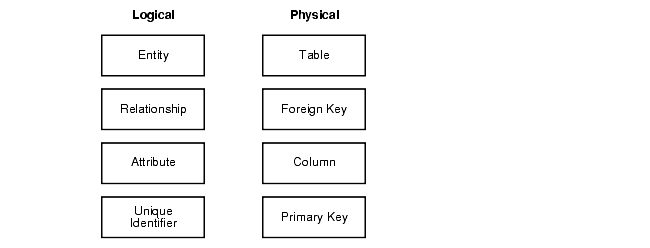
In a sense, logical design is what you draw with a pencil before building your warehouse and physical design is when you create the database with SQL statements.

Logical models use fully normalized entities. 
The entities are linked together using relationships.
 Attributes are used to describe the entities. 
The UID distinguishes between one instance of an entity and another.
A graphical way of looking at the differences between logical and physical designs 


Physical Design

Physical design is where you translate the expected schemas into actual database structures. At this time, you have to map:
  • Entities to Tables
  • Relationships to Foreign Keys
  • Attributes to Columns
  • Primary Unique Identifiers to the Primary Key
  • Unique Identifiers to Unique Keys
You will have to decide whether to use a one-to-one mapping as well.

Physical Design Structures

Translating your schemas into actual database structures requires creating the following:
  • Tablespaces
  • Partitions
  • Indexes
  • Constraints

Tablespaces

Tablespaces need to be separated by differences. For example, tables should be separated from their indexes and small tables should be separated from large tables. 

Partitions

Partitioning large tables improves performance because each partitioned piece is more manageable. Typically, you partition based on transaction dates in a data warehouse. For example, each month. This month's worth of data can be assigned its own partition.

Indexes

Data warehouses' indexes resemble OLTP indexes. An important point is that bitmap indexes are quite common. 

Constraints


Constraints are somewhat different in data warehouses than in OLTP environments because data integrity is reasonably ensured due to the limited sources of data and because you can check the data integrity of large files for batch loads. Not null constraints are particularly common in data warehouses. 


Continue with Data Warehousing Tutorial Part - 6 ... :)

Data Warehousing Tutorial Part - 4

Logical vs. Physical

 The logical design is more conceptual and abstract than the physical design. In the logical design, you look at the logical relationships among the objects. In the physical design, you look at the most effective way of storing and retrieving the objects.
Your design should be oriented toward the needs of the end users. End users typically want to perform analysis and look at aggregated data, rather than at individual transactions. Your design is driven primarily by end-user utility, but the end users may not know what they need until they see it. A well-planned design allows for growth and changes as the needs of users change and evolve.


Type of Data Modeling?

1) Conceptual Data Model
2) Logical Data Model
3) Physical Data Model

Conceptual Data Model - Design Step 1

This is First step for DWH Designing.

Conceptual Data Model is the first step in Data Warehouse design. In conceptual data model, very high level relationships between dimension and fact table is depicted. Conceptual data model not necessarily includes keys, attributes of tables. Conceptual data model gives a very high level idea of proposed Data Warehouse design including possible fact and dimension table. Conceptual data model is the stepping stone to design logical data model of Data Warehouse.


Characteristics of Data Warehouse Conceptual Data Model
  1. It shows only high level relationship between tables.
  2. It does not show primary key or column names
  3. It is the stepping stone of Logical Data Model

Logical Data Model - Design Step -2

This is Second step for Designing  
Good Logical data model in data warehouse implementation is very important. Logical data model has to be detailed (though some might not agree) as it represents the entire business in one shot and shows relationship between business entities. Logical Model should have following things to make it detailed and self explanatory.
  1. All entities to be included in data warehouse
  2. All possible attributes of each entity
  3. Primary keys of each entity ( Natural Keys as well as Surrogate Keys )
  4. Relationships between each every entity
Characteristics of Data Warehouse Logical Data Model
  1. It has all the entities which will be used in data warehouse
  2. It shows all possible attributes of all entities
  3. It depicts the relationships between all entities

Physical Data Model - Design Step -3

This is third step for Designing for DWH Design

Physical Data Model is the actual model which will be created in the database to store the data. It is the most detailed data model in Data Warehouse data modeling. It includes
  1. Tables names
  2. All column names of the table along with data type and size
  3. Primary keys, Foreign Keys of a table
  4. Constraints

Physical Data Model can be converted to actual SQL DDL statement by using different tools. ERWIN is the famous tool to do this.

Continue with Data Warehousing Tutorial Part - 5 .. :)

Data Warehousing Tutorial Part - 3

Typical Data Warehouse Architectures


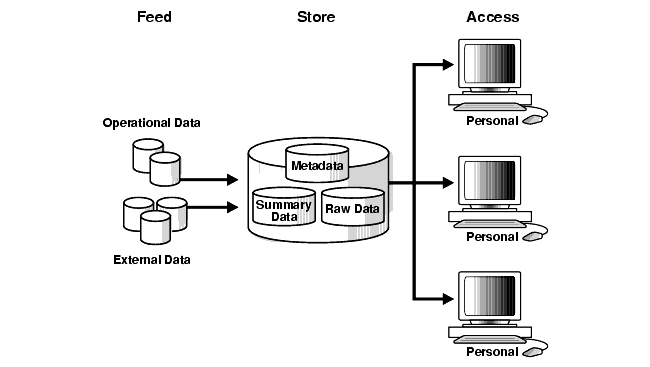
As you might expect, data warehouses and their architectures can vary depending upon the specifics of each organization's situation. shows the most basic architecture for a data warehouse. In it, a data warehouse is fed from one or more source systems, and end users directly access the data warehouse.


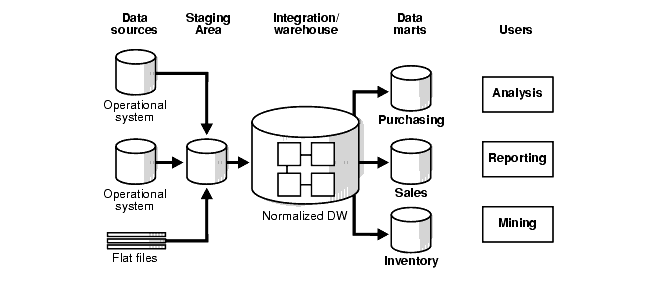
Complete End to End Data Warehouse Architectures


Continue with  Data Warehousing Tutorial Part - 4 ... :)


Data Warehousing Tutorial Part - 2

Contrasting a Data Warehouse with an OLTP System


some of the key differences between a data warehouse's model and an OLTP system's.


One major difference between the types of system is that data warehouses are not usually in third-normal form.

Data warehouses and OLTP systems have vastly different requirements. Here are some examples of the notable differences between typical data warehouses and OLTP systems:
  • Workload
    Data warehouses are designed to accommodate ad hoc queries. The workload of a data warehouse may not be completely understood in advance, and the data warehouse is optimized to perform well for a wide variety of possible query operations.
    OLTP systems support only predefined operations. The application may be specifically tuned or designed to support only these operations.
  • Data Modifications
    The data in a data warehouse is updated on a regular basis by the ETT process (often, every night or every week) using bulk data-modification techniques. The end users of a data warehouse do not directly update the data warehouse.
    In an OLTP system, end users routinely issue individual data-modification statements in the database. The OLTP database is always up-to-date, and reflects the current state of each business transaction.
  • Schema Design
    Data warehouses often use denormalized or partially denormalized schemas (such as a star schema) to optimize query performance.
    OLTP systems often use fully normalized schemas to optimize update/insert/delete performance, and guarantee data consistency.
  • Typical Operations
    A typical data warehouse query may scan thousands or millions of rows. For example, "Find the total sales for all customers last month."
    A typical OLTP operation may access only a handful of records. For example, "Retrieve the current order for a given customer."
  • Historical Data
    Data warehouses usually store many months or years of historical data. This is to support historical analysis of business data.
    OLTP systems usually store only a few weeks' or months' worth of data. The OLTP system only stores as much historical data as is necessary to successfully meet the current transactional requirements.


Continue with  Data Warehousing Tutorial Part - 3 ..... :)

Data Warehousing Tutorial Part - 1


Data Warehousing Concepts
This chapter provides an overview of the Oracle data warehousing implementation. It includes

1) What is a Data Warehouse?
2) Data Warehouse Architectures?

Note that this book is meant as a supplement to standard texts about data warehousing. This book focuses on Oracle-specific material and does not reproduce in detail material of a general nature. Two standard texts are:
  • The Data Warehouse Toolkit by Ralph Kimball (John Wiley and Sons, 1996)
  • Building the Data Warehouse by William Inmon (John Wiley and Sons, 1996)

What is a Data Warehouse?

A data warehouse is a relational database that is designed for query and analysis rather than for transaction processing. It usually contains historical data derived from transaction data, but it can include data from other sources. It separates analysis workload from transaction workload and enables an organization to consolidate data from several sources.

In addition to a relational database, a data warehouse environment includes an extraction, transportation, transformation, and loading (ETL) solution, an online analytical processing (OLAP) engine, client analysis tools, and other applications that manage the process of gathering data and delivering it to business users.

A common way of introducing data warehousing is to refer to Inmon's characteristics of a data warehouse, who says that they are:
  • Subject Oriented
  • Integrated
  • Nonvolatile
  • Time Variant

Subject Oriented

Data warehouses are designed to help you analyze your data. For example, you might want to learn more about your company's sales data. To do this, you could build a warehouse concentrating on sales. In this warehouse, you could answer questions like "Who was our best customer for this item last year?" This kind of focus on a topic, sales in this case, is what is meant by subject oriented.

Integrated

Integration is closely related to subject orientation. Data warehouses need to have the data from disparate sources put into a consistent format. This means that naming conflicts have to be resolved and problems like data being in different units of measure must be resolved.

Nonvolatile

Nonvolatile means that the data should not change once entered into the warehouse. This is logical because the purpose of a warehouse is to analyze what has occurred.

Time Variant

Most business analysis requires analyzing trends. Because of this, analysts tend to need large amounts of data. This is very much in contrast to OLTP systems, where performance requirements demand that historical data be moved to an archive.


Continue with  Data Warehousing Tutorial Part - 2 ..... :)


Tuesday, June 24, 2014

Oracle Data Integrator architecture Complete all components list

Oracle Data Integrator architecture Complete all components list


List of ODI Tools in ODI 12c

List of ODI Tools in ODI 12c
Oracle Data Integrator Tools by Category

This section lists Oracle Data Integrator tools by category.

Metadata

OdiReverseGetMetaData

OdiReverseManageShortcut

OdiReverseResetTable

OdiReverseSetMetaData

Oracle Data Integrator Objects

OdiDeleteScen

OdiExportAllScen

OdiExportEnvironmentInformation

OdiExportLog

OdiExportMaster

OdiExportObject

OdiExportScen

OdiExportWork

OdiGenerateAllScen

OdiImportObject

OdiImportScen

Utilities

OdiAnt

OdiBeep

OdiEnterpriseDataQuality

OdiKillAgent

OdiOSCommand

OdiPingAgent

OdiPurgeLog

OdiReinitializeSeq

OdiRemoveTemporaryObjects

OdiStartLoadPlan

OdiStartOwbJob

OdiStartScen

OdiUpdateAgentSchedule

Internet Related Tasks

OdiFtp

OdiFtpGet

OdiFtpPut

OdiInvokeWebService

OdiReadMail

OdiScpGet

OdiScpPut

OdiSftp

OdiSftpGet

OdiSftpPut

OdiSendMail

Files

OdiFileAppend

OdiFileCopy

OdiFileDelete

OdiFileMove

OdiFileWait

OdiMkDir

OdiOutFile

OdiSqlUnload

OdiUnZip

OdiZip

SAP

OdiSAPALEClient and OdiSAPALEClient3

OdiSAPALEServer and OdiSAPALEServer3

XML

OdiXMLConcat

OdiXMLSplit

Event Detection

OdiFileWait

OdiReadMail

OdiSleep

OdiWaitForChildSession

OdiWaitForData

OdiWaitForLoadPlans

OdiWaitForLogData

OdiWaitForTable

Changed Data Capture

OdiManageOggProcess

OdiRefreshJournalCount

OdiRetrieveJournalData

OdiWaitForData

OdiWaitForLogData

OdiWaitForTable

Alphabetical List of Oracle Data Integrator Tools

This section lists Oracle Data Integrator tools in alphabetical order.

OdiAnt

OdiBeep

OdiDeleteScen

OdiEnterpriseDataQuality

OdiExportAllScen

OdiExportEnvironmentInformation

OdiExportLog

OdiExportMaster

OdiExportObject

OdiExportScen

OdiExportWork

OdiFileAppend

OdiFileCopy

OdiFileDelete

OdiFileMove

OdiFileWait

OdiFtp

OdiFtpGet

OdiFtpPut

OdiGenerateAllScen

OdiImportObject

OdiImportScen

OdiInvokeWebService

OdiKillAgent

OdiManageOggProcess

OdiMkDir

OdiOSCommand

OdiOutFile

OdiPingAgent

OdiPurgeLog

OdiReadMail

OdiRefreshJournalCount

OdiReinitializeSeq

OdiRemoveTemporaryObjects

OdiRetrieveJournalData

OdiReverseGetMetaData

OdiReverseManageShortcut

OdiReverseResetTable

OdiReverseSetMetaData

OdiSAPALEClient and OdiSAPALEClient3

OdiSAPALEServer and OdiSAPALEServer3

OdiScpGet

OdiScpPut

OdiSendMail

OdiSftp

OdiSftpGet

OdiSftpPut

OdiSleep

OdiSqlUnload

OdiStartLoadPlan

OdiStartOwbJob

OdiStartScen

OdiUnZip

OdiUpdateAgentSchedule

OdiWaitForChildSession

OdiWaitForData

OdiWaitForLoadPlans

OdiWaitForLogData

OdiWaitForTable

OdiXMLConcat

OdiXMLSplit


OdiZip

ODI multiple agents with cluster RAC configuration


The following is a depiction of ODI agent deployed in a cluster, connected to Oracle RAC repository.